Short answer: use story points to plan sprints and time estimates to track work in progress. Points compare work with other work, so they are quick to agree on and they feed velocity. Hours say how long something should take, which is useful while it is being done and unreliable months ahead.
Jira keeps the two in different fields, a board reads only one of them for its reports, and many teams end up using both without having decided to. This article explains what each one is for and how to keep them from contradicting each other.
What each field is#
Story points are a number on a scale the team agrees on. A 5 means “about as much as the other 5s”, not “five hours”. Jira stores them in a number field — usually Story Points in company-managed projects and Story point estimate in team-managed ones.
Time estimates are Jira’s time tracking fields:
- Original Estimate — how long the work was expected to take when it was planned;
- Remaining Estimate — how much is left now; it goes down as people log work.
Jira writes durations as 1w 2d 4h 30m. By default a day is 8 hours and a week is 5 days; a Jira
administrator can change both under Settings → Work items → Time Tracking (Atlassian’s
guide), so
check yours before you convert anything by hand.
Which one the board uses#
A Scrum board reads one estimation statistic for its badges, its velocity report and its burndown. Where you choose it depends on the project (Atlassian’s guide):
- Company-managed: open the board’s More actions (•••), then Board settings → Estimation. The velocity report can run on story points, original time, work item count or another number field.
- Team-managed: estimation is off by default. Open More actions (•••) next to the project name, then Space settings → Features, and turn on Estimation. The options are story points and time.
A value in the other field is still stored and still shown on the issue, but the board’s reports ignore it. That is the most common reason a team “estimated everything” and the velocity chart still shows nothing: the numbers went into a field the board does not read.
When to use which#
Story points suit sprint planning. Sizes are compared with each other, not with the clock, so the conversation is “is this bigger than that?” — quicker to agree on than hours, and less personal. Many teams size them with planning poker, where everyone votes privately so the first number spoken does not anchor the rest. Over a few sprints the team’s completed points per sprint (its velocity) becomes a reliable guide to how much to plan.
Time suits tracking work in progress. Remaining Estimate answers “how much is left on this issue?” during the sprint, and logged work answers “where did the time go?” afterwards.
Using both is common and fine — points at planning, time during the sprint — as long as the board’s estimation field is the one you plan with.
Picking a scale for story points#
Most teams use a scale whose steps widen as items grow, because the uncertainty does too:
| Scale | Values | Good for |
|---|---|---|
| Fibonacci | 1, 2, 3, 5, 8, 13, 21… | The classic; big items look visibly uncertain |
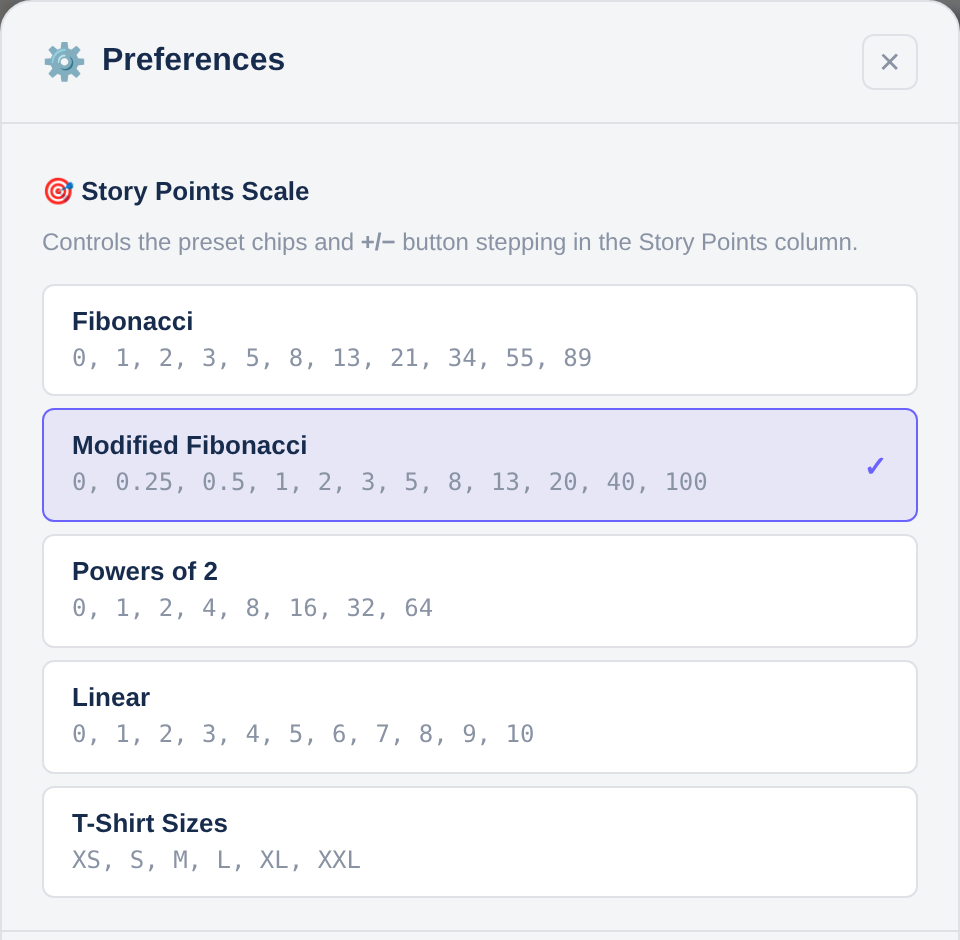
| Modified Fibonacci | 0.25, 0.5, 1, 2, 3, 5, 8, 13, 20, 40, 100 | The planning-poker deck; rounds the large values |
| Powers of 2 | 1, 2, 4, 8, 16, 32, 64 | Teams that think in “twice as big” |
| Linear | 1–10 | Small, well-understood items |
| T-shirt sizes | XS, S, M, L, XL, XXL | Early backlog refinement, before numbers mean much |
T-shirt sizes are not numbers, so Jira cannot add them up. They need their own field, and a team that wants velocity eventually maps them to points.
The choice of scale matters less than it seems. In a simulation of 200,000 planning poker rounds, five voters on Fibonacci cards had a median error of 22.4%, against 20.3% for the same five with no cards at all.
How many hours is a story point?#
None, on purpose. A point is not a fixed amount of time: the same 5 can take one person two days and another four, and it can vary with the sprint. Teams that publish a conversion, such as “1 point = 4 hours”, turn points back into hours with extra steps, and lose the reason to use them.
If someone outside the team needs dates, forecast from velocity: a 120-point backlog at 30 points per sprint is about four sprints. That is a statement about the team’s history, not a promise about hours.
Estimating both in one place#
Scope Planner puts story points, Original and Remaining in the same row of one table, for a whole sprint, a backlog or any JQL. It is on the Atlassian Marketplace, with a free trial.
- Pick your story-points scale in ⚙️ Preferences; the cells offer that scale’s values.
- Type time as a Jira duration (
1d 2h,1w) or as a bare number in the unit you chose. - Totals for points and both time fields update as you type.
- If the board estimates on a different field than the app is configured to use, the app warns you, so the numbers do not go into a field the board ignores.
Editing many issues at once has its own article: how to bulk-edit story points in Jira.
Estimating and drafts are free; publishing the estimates to Jira is part of Pro — see Free and Pro. The user guide covers every cell type.
Frequently asked questions#
Should I estimate in story points or hours?#
Use story points to plan sprints, because they are quicker to agree on and feed velocity. Use hours when you need to track remaining work on an issue. Many teams use both, as long as the board’s estimation field is the one they plan with.
Can I use story points and time estimates together in Jira?#
Yes. They are separate fields, so an issue can hold both. The board’s reports read only the one chosen in its estimation settings.
How do I change a Jira board from story points to hours?#
In a company-managed project, open Board settings → Estimation and change the statistic. In a team-managed project, change it under Features → Estimation. Reports then read the new field, so existing estimates in the old one stop counting.
What is the difference between Original Estimate and Remaining Estimate?#
Original Estimate is what the work was expected to take when planned. Remaining Estimate is how much is left now, and it goes down as people log work.